A design studio owner is asked, casually, “so where does most of your team’s time actually go?” She pauses. Client work, obviously. Some admin. A lot of email, probably. Mid-answer, she realizes she’s describing an impression, not anything she could actually prove — and every hiring, pricing, and automation decision she’s made has been built on that same impression.
This piece gives a concrete, two-week method for replacing that guesswork with real data: what to log, how to involve staff without it feeling like surveillance, and how to spot the pattern that actually matters.
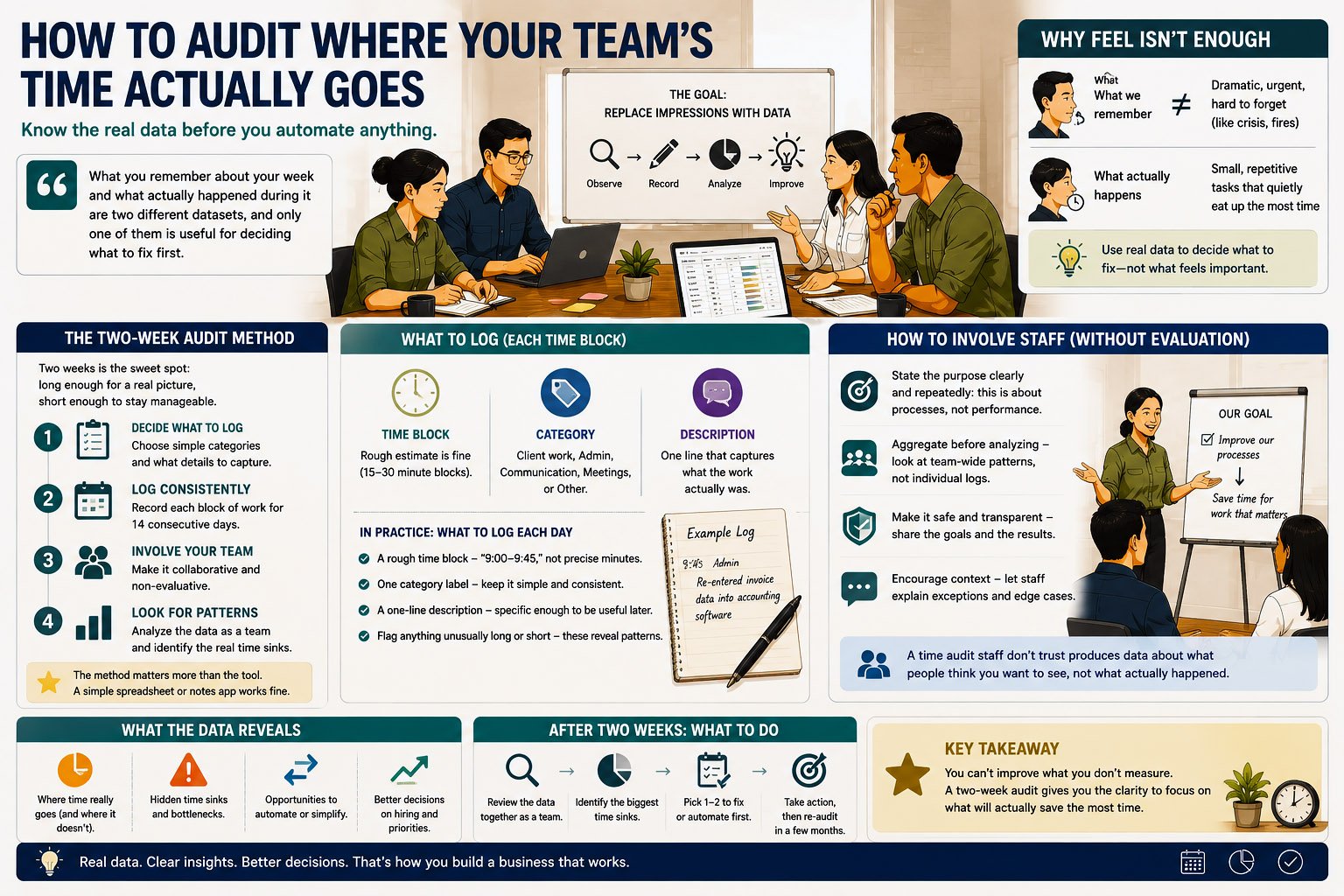
How to Audit Where Your Team’s Time Actually Goes
A small design studio owner is asked, in a casual conversation with another founder, “so where does most of your team’s time actually go?” She pauses. Client work, obviously. Some admin. A lot of email, probably. Meetings, sure. She realizes, mid-answer, that she’s describing a rough impression rather than anything she could actually back up — and that every decision she’s made about hiring, pricing, and what to automate has been built on that same impression.
This is normal. Most small business owners run their team by feel, and feel is a perfectly reasonable way to operate day to day. It’s a much weaker foundation for deciding what to automate, because automating the wrong workflow — one that felt like the big time sink but wasn’t — wastes effort and delays fixing the thing that’s actually costing you the most. Before any of that, you need real data. This is exactly what a two-week time audit is for.
Why Feel Isn’t Enough
Impressions of where time goes are shaped by what’s memorable, not what’s frequent. A dramatic client fire drill sticks in memory far more than the fifteen minutes spent, four times a day, manually re-entering the same information into two different systems — even though the second one, over a week, almost certainly costs more total time.
What you remember about your week and what actually happened during it are two different datasets, and only one of them is useful for deciding what to fix first.
A real audit replaces memory with observation, over a period long enough to capture a representative picture rather than one unusually busy or unusually quiet week.
The Two-Week Audit Method, in Overview
Two weeks is the sweet spot for most small businesses: long enough to smooth out one unusual day or a single client emergency, short enough that it doesn’t become its own burden. The method has four parts: decide what to log, log consistently for two weeks, involve your team without making it feel like a performance review, and then look for patterns rather than individual data points.
None of this requires special software. A shared spreadsheet, a notes app, or even a simple paper log works — the method matters more than the tool.
What to Log
The goal is category-level tracking, not minute-by-minute surveillance. For each block of work, someone logs three things: a rough time estimate (to the nearest 15–30 minutes is plenty), a short category label, and one line describing what it actually was.
Useful categories for most small businesses include: client or customer-facing work, internal admin (invoicing, scheduling, data entry), communication (email, messaging, calls not tied to a specific project), meetings, and a catch-all “other” for anything that doesn’t fit — which is often revealing on its own, since a large “other” bucket usually means your categories don’t match how your team actually spends time, and it’s worth revisiting them.
In Practice: What to Log Each Day
- A rough time block — “9:00–9:45,” not a precise stopwatch reading.
- One category label — client work, admin, communication, meetings, or other.
- A one-line description — specific enough to be useful later (“re-entering invoice details from email into accounting software,” not just “admin”).
- Anything unusually long or short, flagged briefly — these are often the most revealing entries once you review the data.
How to Involve Staff Without It Feeling Evaluative
This is the part most owners get wrong, and it’s worth being direct about why: if staff sense the audit is really about judging their productivity, the data quietly becomes unreliable — people round up “real work” categories and round down anything that looks like slacking, even unconsciously.
A time audit staff don’t trust produces data about what people think you want to see, not about what actually happened.
Frame the audit explicitly as diagnostic, aimed at the business’s processes, not anyone’s performance. Say this plainly, more than once: “I’m not looking at who’s fastest or slowest — I’m looking at which tasks eat the most total time across the team, so we can fix the process, not the person.” Share the actual purpose — deciding what’s worth automating — so staff understand the audit has a concrete, useful outcome rather than existing for its own sake. And critically, don’t review individual logs in a way that singles anyone out; look at aggregated patterns across the team, not one person’s day.
In Practice: Keeping the Audit Diagnostic, Not Evaluative
- State the purpose explicitly and repeatedly: this is about processes, not performance.
- Aggregate before you analyze — look at team-wide patterns, not any one person’s individual log.
- Never bring up an individual’s log in a one-on-one conversation as if it were a performance data point.
- Share what you find with the team afterward, framed around what’s changing as a result — this closes the loop and builds trust for the next time you need honest data.
Week One vs. Week Two: What to Expect
The first few days of any time audit tend to be slightly distorted — people are more conscious of their time than usual, and there’s often a small “audit effect” where behavior shifts a little just from being observed. This settles by the end of week one for most teams. Week two is usually the more representative data, though both weeks are worth keeping, since comparing them can itself be informative — a category that shrinks noticeably from week one to week two often reveals a task people were quietly avoiding logging accurately.
If week one includes an unusual event — a big client emergency, a public holiday, someone out sick — it’s worth extending the audit by a few more days rather than treating a skewed week as representative.
How to Spot Patterns Once You Have the Data
Once two weeks of logs exist, the analysis is more about honest pattern-spotting than sophisticated statistics.
In Practice: Questions to Ask of Your Data
- Which category consistently takes the most total hours across the team, not just on any single busy day?
- Which specific task shows up most often in the one-line descriptions, even if the category itself isn’t the largest?
- Where do the “unusually long” flags cluster — are they scattered randomly, or concentrated around one specific recurring task?
- What’s in the “other” bucket, and does it reveal a category you didn’t think to track?
A pattern worth acting on usually shows up clearly across both weeks and across more than one person — a single person’s one-off bad day isn’t a pattern, but three staff members independently logging the same repetitive task as a recurring time sink almost certainly is.
Getting the Categories Right Before You Start
The categories you choose shape what you’ll be able to see later, so it’s worth a few minutes of thought before day one rather than adjusting mid-audit, which makes the two weeks harder to compare consistently. Too few categories and everything collapses into vague buckets that don’t reveal anything specific. Too many, and staff spend more time deciding which category applies than actually logging.
The right number of categories is usually five to seven — few enough to log quickly without thinking hard, specific enough that a pattern in the data actually points somewhere useful.
A reasonable starting set for most small businesses: client or customer-facing work, internal admin, communication, meetings, and other — adjusted slightly based on what your business actually does. A retail operation might split “customer-facing” into in-person and online. A professional services firm might separate “client work” from “proposal and pitch work,” since those often have very different time profiles worth seeing separately.
A Worked Example
A ten-person boutique accounting firm ran a two-week audit expecting to confirm what the owner already suspected: that client-facing consultation calls were eating the most time. The data told a different story. Consultation calls were significant, but a specific category — manually reformatting client-provided financial data into the firm’s own reporting templates — showed up across nearly every staff member’s log, several times a week, and added up to more total hours than any single client-facing category.
Nobody had flagged this before the audit, including the staff doing it daily, because it felt like “just part of the job” rather than a distinct, nameable task worth questioning. Once it was visible in the aggregated data, it became the obvious first candidate for automation — not because it was dramatic, but because the numbers said so plainly.
The task that turned out to matter most wasn’t the one anyone would have guessed. It was the one nobody had bothered to name until the audit forced them to.
Common Mistakes
The most common mistake is making the audit too granular — tracking time to the minute, with dozens of hyper-specific categories, which becomes tedious enough that people stop logging accurately by day three. A close second is running the audit for too short a period, a single unusual week that gets treated as representative when it wasn’t. The quieter mistake is skipping the “why” conversation with staff at the start — an audit introduced without context reads as surveillance, and the data quality suffers accordingly, even if nobody says so directly.
What to Do With What You Find
Once the audit surfaces a clear pattern, the next step isn’t automating immediately — it’s running that pattern through a real evaluation of whether it’s actually worth automating, using volume, repetition, and cost of delay or error as the criteria, covered in full in finding the leverage in your operations. If the pattern you find feels ambiguous rather than clearly high-leverage, signs you’re ready to automate a workflow walks through more specific, checkable tests. And if you’re tempted to jump straight to automating whatever felt most memorable during the audit rather than what the data actually showed, avoiding the wrong first target covers exactly that trap.
How to Know You’re Ready to Run This
In Practice: Signs You’re Ready
- You genuinely don’t know, with confidence, where most of your team’s time goes — that uncertainty is itself the signal you need real data, not more guessing.
- You can commit to two full weeks, not a rushed few days that would skew the results.
- You’re prepared to frame this clearly to your team as diagnostic, not evaluative, and to actually mean it.
- You have a simple way to log entries already available — a shared spreadsheet or notes doc is enough; don’t let tool selection delay starting.
Frequently Asked Questions
Do I need special software to run this audit? No — a shared spreadsheet or even a simple shared notes document works fine. The method matters far more than the tool.
What if my team resists logging their time? Address the concern directly rather than mandating compliance — explain the diagnostic purpose clearly, and consider having leadership log their own time too, which signals this isn’t something only applied to staff.
How detailed should the one-line descriptions actually be? Detailed enough that you could understand what happened without asking the person later — “answered client emails” is too vague; “responded to three client emails about invoice questions” is useful.
What if the audit reveals I was completely wrong about where time goes? That’s actually the most valuable possible outcome — it means the audit did its job, revealing a real blind spot rather than just confirming what you already believed.
Should I run this audit again after making changes? Yes — a follow-up audit a few months after any change is the clearest way to confirm whether the change actually reduced the time spent on the target task, rather than assuming it worked.
Can a very small team, like two or three people, still benefit from this? Yes, though it’s lighter — with a very small team, a shorter, less formal version of the same method (a shared running log, checked in on weekly) usually works fine.
What if different staff members log very differently — some detailed, some vague? Set a brief shared example at the start, showing what a good log entry looks like, so everyone’s working from the same standard rather than improvising their own approach.
Is two weeks really enough, or should I run it longer? Two weeks is enough for most small businesses to see real patterns; a longer audit adds diminishing returns unless your business has unusually irregular cycles (e.g., a strong seasonal swing), in which case extending to capture both a typical and an atypical period is worth considering.
What if I run the audit and nothing surprising turns up? That’s a useful outcome too — confirming your existing sense of where time goes, with real data behind it, still gives you more confidence in the automation decisions that follow than intuition alone would.
Should the audit include time spent outside normal working hours, like evenings or weekends? Yes, if that’s genuinely part of how the business runs — excluding it would understate the real picture, especially for owner-operators who do a meaningful share of admin work outside standard hours.
Final Thoughts
The design studio owner from the opening ran her own two-week audit a few weeks after that conversation with the other founder. What she found wasn’t dramatic — no single shocking discovery, just a clearer, more honest picture of where her team’s hours actually went, including a specific admin task that turned out to be quietly eating more time than any client project. That’s usually what a good audit produces: not a surprise twist, just the confidence to make your next decision based on evidence instead of memory.
This is the first, most foundational step in finding the leverage in your operations — everything else in deciding what to automate builds on having this real picture in hand. For the broader context, see AI for SMEs and startups.
Last updated: September 2026
Related Reads
- AI for SMEs & Startups: A Practical Guide to Getting Started
- Finding the Leverage: What to Automate First
- How to Audit Where Your Team’s Time Actually Goes
- Signs You’re Ready to Automate a Workflow
- The Most Commonly Automated SME Workflows (And Whether They’re Worth It)
- How to Avoid Automating the Wrong Thing First