A small business owner searches “best AI tools for small business” and gets back thirty-plus options, each described in the same breathless language — “revolutionize your workflow,” “save hours instantly.” Every tool sounds essential. None of the lists say which ones are actually worth trying first.
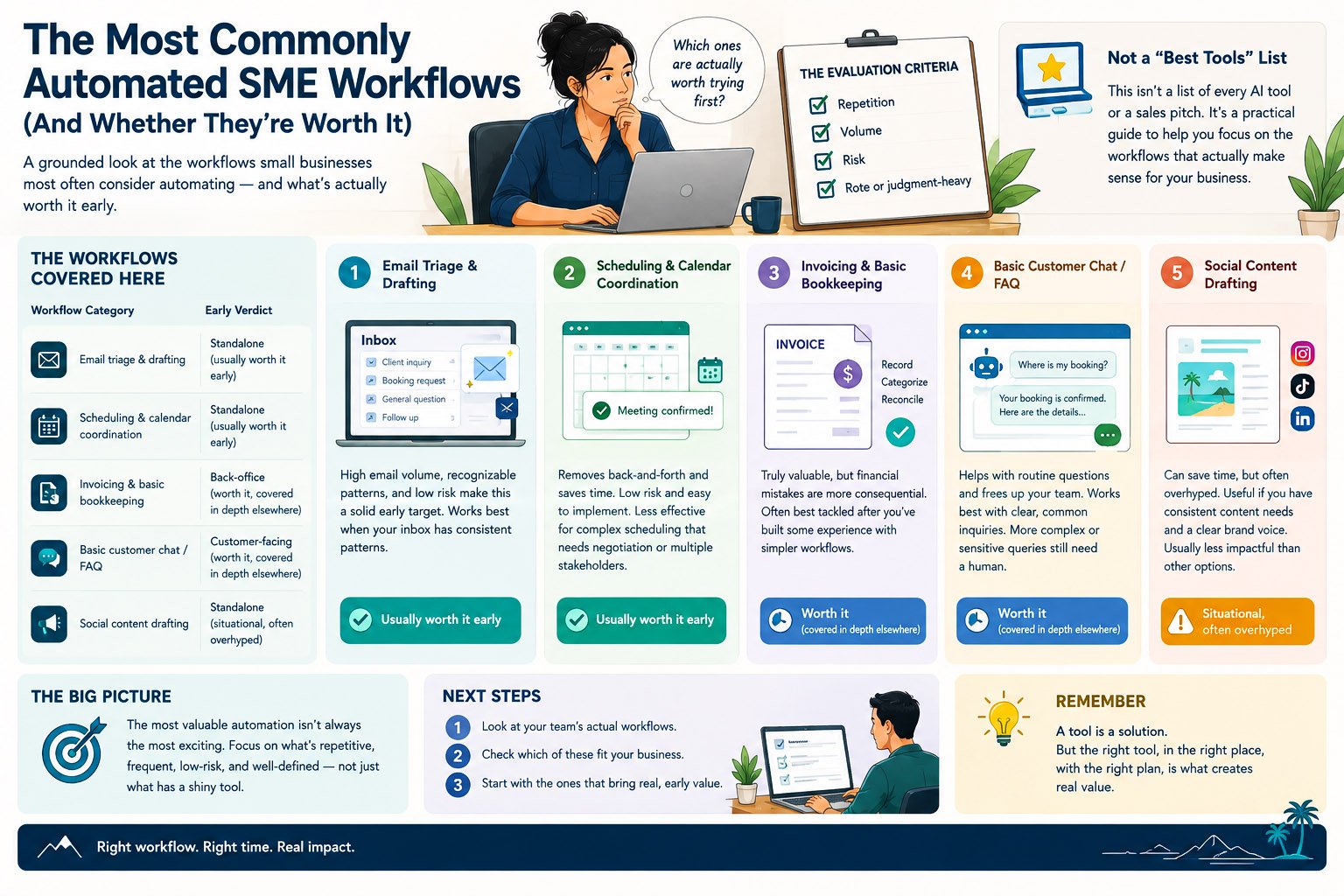
This is the honest alternative: email triage, scheduling, invoicing, customer chat, social content — five commonly automated workflows, each given a real verdict (worth it early, situational, or overhyped) instead of uniform enthusiasm.
A small business owner searches “best AI tools for small business” and gets back a list of thirty-plus options, each described in roughly the same breathless language — “revolutionize your workflow,” “save hours instantly.” Every tool sounds essential. None of the lists say which ones are actually worth trying first for a business his size, or which are solving a problem he doesn’t really have.
This is a grounded alternative to that kind of list: the workflows small businesses most commonly consider automating, with an honest verdict on each — usually worth it early, situational, or generally overhyped for most small businesses — rather than a uniform chorus of enthusiasm. Two of these workflows (back-office admin and customer-facing operations) get their own dedicated, in-depth treatment elsewhere on this site; this piece covers them briefly and points onward, focusing its own depth on the workflows that don’t have a dedicated home yet.
Why a Grounded Survey Beats a Generic “Best Tools” List
Most “best AI tools” content is written by or for the tools themselves — sponsored placements, affiliate links, or simply an incentive to make every category sound exciting so the reader keeps scrolling. That’s a fundamentally different goal from helping you decide where to actually spend your limited time and attention.
A list where every single item is described as essential isn’t actually a list of priorities. It’s a list of everything, dressed up to look like guidance.
The workflows below are evaluated the same way any single candidate would be — repetition, volume, risk, and whether the task is rote or judgment-heavy — rather than assumed worthwhile just because a tool exists for it.
The Workflows Covered Here
| Workflow | Category | Early verdict |
|---|---|---|
| Email triage & drafting | Standalone | Usually worth it early |
| Scheduling & calendar coordination | Standalone | Usually worth it early |
| Invoicing & basic bookkeeping | Back-office | Worth it, covered in depth elsewhere |
| Basic customer chat / FAQ | Customer-facing | Worth it, covered in depth elsewhere |
| Social content drafting | Standalone | Situational, often overhyped |
Email Triage & Drafting
This is one of the most consistently worthwhile early automation targets for a small business, and it’s worth understanding why: email volume is high for almost every business, a large share of incoming email follows recognizable patterns (routine inquiries, scheduling requests, simple confirmations), and the cost of a slightly imperfect draft is low, since a human reviews it before sending.
A tool that sorts incoming email into rough categories and drafts a first-pass reply to the more routine ones — leaving anything ambiguous or sensitive for a person to handle from scratch — captures real time without much risk. The honest caveat: this works best when your inbox actually has recognizable patterns. A business fielding highly varied, one-off inquiries won’t see the same benefit, since there’s less genuine repetition for a drafting tool to learn from.
Verdict: usually worth it early, for any business with a reasonably high volume of routine, recognizable email traffic.
Scheduling & Calendar Coordination
Scheduling meetings, calls, or appointments back and forth by email is a small, repetitive tax that adds up surprisingly fast across a team, and it’s one of the lowest-risk workflows to automate — a scheduling error is annoying, rarely catastrophic, and usually caught and fixed quickly.
Tools that let others book directly into available slots, or that draft scheduling replies based on your actual calendar, remove most of the back-and-forth without requiring any judgment call beyond what your calendar already reflects. The honest caveat: this works well for straightforward meeting scheduling and less well for scheduling that involves real negotiation — multiple stakeholders’ competing preferences, or decisions about priority — which still benefits from a person’s judgment.
Verdict: usually worth it early, and often one of the fastest, least controversial wins available to a small team.
Invoicing & Basic Bookkeeping
Invoicing and basic bookkeeping automation is genuinely valuable, but it comes with a specific caution worth repeating briefly here: financial mistakes are more consequential than most other automation errors, since a wrong invoice or bookkeeping entry creates a real discrepancy someone has to untangle, not just an awkward moment. This is exactly why a human check stays part of the process here longer than it does for lower-stakes tasks like email drafting.
Verdict: worth it, with care — this workflow, along with scheduling and documentation admin, gets full, in-depth treatment in back-office and admin automation, including the specific tools and honest tradeoffs worth knowing before starting.
Basic Customer Chat & FAQ
A narrow chatbot handling a handful of genuinely repetitive customer questions — hours, pricing, policies, order status — is one of the more reliable customer-facing automation wins available, provided it’s scoped narrow and has a clear handoff to a person for anything it shouldn’t attempt. The honest caveat, covered at length elsewhere on this site: over-scoping this at launch, trying to handle every conceivable question instead of the handful that are actually repetitive, is the single most common way this specific workflow disappoints.
Verdict: worth it, scoped carefully — the full breakdown of what a chatbot handles well versus what still needs a human, plus personalization, sales follow-up, and more sophisticated assistants, is covered in AI for customer-facing operations.
Social Content Drafting
This is one of the most heavily marketed AI use cases for small businesses, and also one of the more genuinely situational ones. AI can draft a reasonable first pass at social captions, basic post ideas, or simple ad copy variations quickly — useful if your bottleneck is genuinely the blank-page problem of starting a post. It’s considerably less useful, and often actively counterproductive, for building a distinctive brand voice, since AI-drafted content tends toward generic phrasing unless heavily edited, and audiences increasingly notice and discount content that reads as obviously AI-generated.
The businesses that get real value from AI-assisted social content are the ones using it to beat the blank page, then editing hard. The businesses disappointed by it are the ones publishing the first draft unedited and wondering why engagement feels flat.
Verdict: situational, often overhyped — worth trying for structure and ideation, risky if treated as a finished-product generator, and rarely a business’s highest-leverage automation target even when it feels like the most obvious “AI” use case to reach for first.
In Practice: Quick Verdicts at a Glance
- Email triage & drafting — usually worth it early, for businesses with recognizable inbox patterns.
- Scheduling & coordination — usually worth it early, low risk, fast win.
- Invoicing & bookkeeping — worth it, with a human check kept in place longer than for lower-stakes tasks.
- Basic customer chat — worth it, but only when scoped narrow from the start.
- Social content drafting — situational; useful for structure, risky as a finished-product generator.
Workflows That Are Usually Overhyped for Small Businesses Specifically
Beyond social content, a few other categories deserve a specific note of caution, since they’re marketed heavily but rarely deliver proportional value at small-business scale. Fully autonomous customer service — a system handling every interaction with no human oversight at all — is oversold broadly, and especially so for a small business without the volume or stakes to justify the sophistication and ongoing maintenance it requires. Similarly, elaborate “AI-powered analytics dashboards” promising deep insight from a small business’s relatively modest data volume often provide less genuine insight than a business owner’s own honest, close attention to a handful of key numbers — sophistication built on too little data tends to produce confident-sounding but not especially reliable conclusions.
The pattern behind most overhyped small-business AI tools is the same: they’re built and marketed for a data volume and team structure a small business doesn’t actually have.
Choosing a Tool Within a Category You’ve Chosen
Once you’ve identified a workflow worth pursuing from this list, a separate decision remains: which specific tool or tier to actually use. This deserves a brief word, since it’s a common place small businesses overspend. For any of the “worth it early” workflows above, a simple, narrow tool — often free or low-cost — captures most of the available value; the more expensive, feature-rich platforms in each category are usually built for a scale of business well beyond a typical SME, and paying for that sophistication rarely pays off before you’ve proven the simpler version works.
In Practice: Avoiding Over-Tooling
- Start with the simplest tool that does the specific job, not the most fully-featured platform in the category.
- Resist a long-term contract or annual commitment for a workflow you haven’t tested for at least a month.
- Check whether a feature you’re paying extra for is something you’d actually use weekly — many premium tiers bundle capabilities most small businesses never touch.
- Revisit the decision after real use, not before — it’s easier to judge whether a more expensive tier is worth it once you know exactly what the simple version is missing.
Workflows Worth Trying Early, and Why They Share a Pattern
It’s worth naming what email triage, scheduling, and a narrow customer chatbot have in common, since it’s a useful lens for evaluating any workflow not covered specifically in this list: high genuine repetition, low-to-moderate risk if something goes slightly wrong, and a clear, checkable structure to the input and output. These are exactly the five tests covered in signs you’re ready to automate a workflow — this survey is really just those tests applied across the workflows small businesses ask about most often, rather than a separate framework.
How to Apply This List to Your Own Business
This list is a starting point for browsing, not a substitute for evaluating your own specific situation. If you haven’t yet identified where your own team’s time actually goes, auditing where your team’s time actually goes is the step that comes before choosing from any list like this one. And once you have a candidate workflow in mind — whether from this list or something specific to your business — finding the leverage in your operations covers how to weigh it against competing priorities rather than assuming the first plausible option is the right one.
A Worked Example
A ten-person marketing agency worked through this exact list before deciding where to start. Social content drafting was the most tempting option — it felt like the most “on brand” use of AI for a marketing business — but running it through the five-test framework revealed a weak structure score (client social content varied enormously by account) and a real risk that AI-generated drafts would undercut the very brand-voice work clients were paying the agency for.
Email triage, by contrast, scored well across every test: high volume, genuinely repetitive categories (project status updates, scheduling requests, simple client questions), low risk since a human reviewed every draft, and clear structure. The agency started there instead, freeing up several hours a week that account managers redirected toward the client-facing creative work that actually needed their judgment — including, eventually, a more careful, well-edited approach to AI-assisted content drafting once the team had more experience testing and trusting AI tools generally.
Common Mistakes When Browsing This Kind of List
The most common mistake is treating every workflow on a list like this as equally worth pursuing, rather than running each candidate through the same honest tests — repetition, volume, risk, structure, judgment — that any single workflow decision deserves. A close second is choosing the workflow that feels most exciting or most “AI-forward” to describe, rather than the one that actually scores best against your specific business’s real patterns — social content drafting is the clearest example of this pull, given how heavily it’s marketed relative to how reliably it delivers value. The quieter mistake is assuming a workflow that worked well for a similar-sounding business will automatically work the same way for yours — the same category of task (customer chat, invoicing, social content) can score very differently depending on your business’s actual volume, risk profile, and how much genuine repetition exists in your specific version of it.
A list like this one is a set of hypotheses worth testing against your own business, not a set of verdicts to accept on faith.
Frequently Asked Questions
Should I automate all five of these workflows if my business has all five? Not all at once — pick the one that scores best against your own situation using the five-test framework, prove it works, and let that experience inform the next one, rather than launching several at once.
Is social content drafting really not worth trying at all? It’s worth trying specifically for structure and idea generation — the caution is against treating its output as finished, publishable content without real editing, not against using it at all.
What if a workflow on this list doesn’t quite match what my business actually does? Use the underlying tests rather than the specific category — the point of this list is to illustrate the pattern (repetition, volume, low-to-moderate risk, clear structure) so you can recognize it in a workflow unique to your own business.
Why do invoicing and customer chat get less depth here than the other three? Both deserve fuller treatment than a survey format allows — the dedicated pillar pages linked above cover the specific tools, tradeoffs, and honest cautions for each in real depth.
Are there workflows worth automating that aren’t on this list at all? Likely yes, depending on your specific business — this list covers the ones most SMEs ask about first, not an exhaustive catalog. The five-test framework applies to any candidate workflow, listed here or not.
How do I know if my business’s version of a “usually worth it early” workflow is actually an exception? Run it through the five tests specifically for your business rather than trusting the general verdict — a workflow that’s usually low-risk can be genuinely higher-risk in a specific business context, and it’s worth checking rather than assuming.
Is it a bad sign if none of these five workflows seem like a good fit for my business? Not necessarily — it may mean your business’s highest-leverage opportunity is something not covered in this general survey; an honest time audit of your own operations is a more reliable way to find it than working down a generic list.
How often should I revisit this kind of list as my business grows? Periodically — what’s overhyped or premature for a five-person business can become genuinely worthwhile once volume and complexity grow, so a workflow set aside once is worth reconsidering as your business changes.
Should I worry about vendor lock-in when choosing a tool for one of these workflows? It’s worth a brief check — favor tools that let you export your data easily and don’t require deep, hard-to-reverse integration for a first attempt, since you may want to switch once you’ve learned more about what you actually need.
Is it worth asking other small business owners which of these workflows worked for them? Useful for ideas, but treat their results as one data point rather than a verdict — their business’s specific volume, risk tolerance, and repetition may differ from yours in ways that change the answer.
Final Thoughts
The business owner from the opening didn’t need thirty more tool recommendations, each described as essential. He needed an honest sense of which of the workflows he was already considering were genuinely likely to pay off early, and which were mostly marketing dressed up as urgency. That’s what this list is for — not a complete catalog, just a grounded starting point, evaluated the same honest way any single automation decision deserves.
This fits within the broader picture of finding the leverage in your operations and AI for SMEs and startups as a whole.
Last updated: September 2026
Related Reads
- AI for SMEs & Startups: A Practical Guide to Getting Started
- Finding the Leverage: What to Automate First
- How to Audit Where Your Team’s Time Actually Goes
- Signs You’re Ready to Automate a Workflow
- The Most Commonly Automated SME Workflows (And Whether They’re Worth It)
- How to Avoid Automating the Wrong Thing First