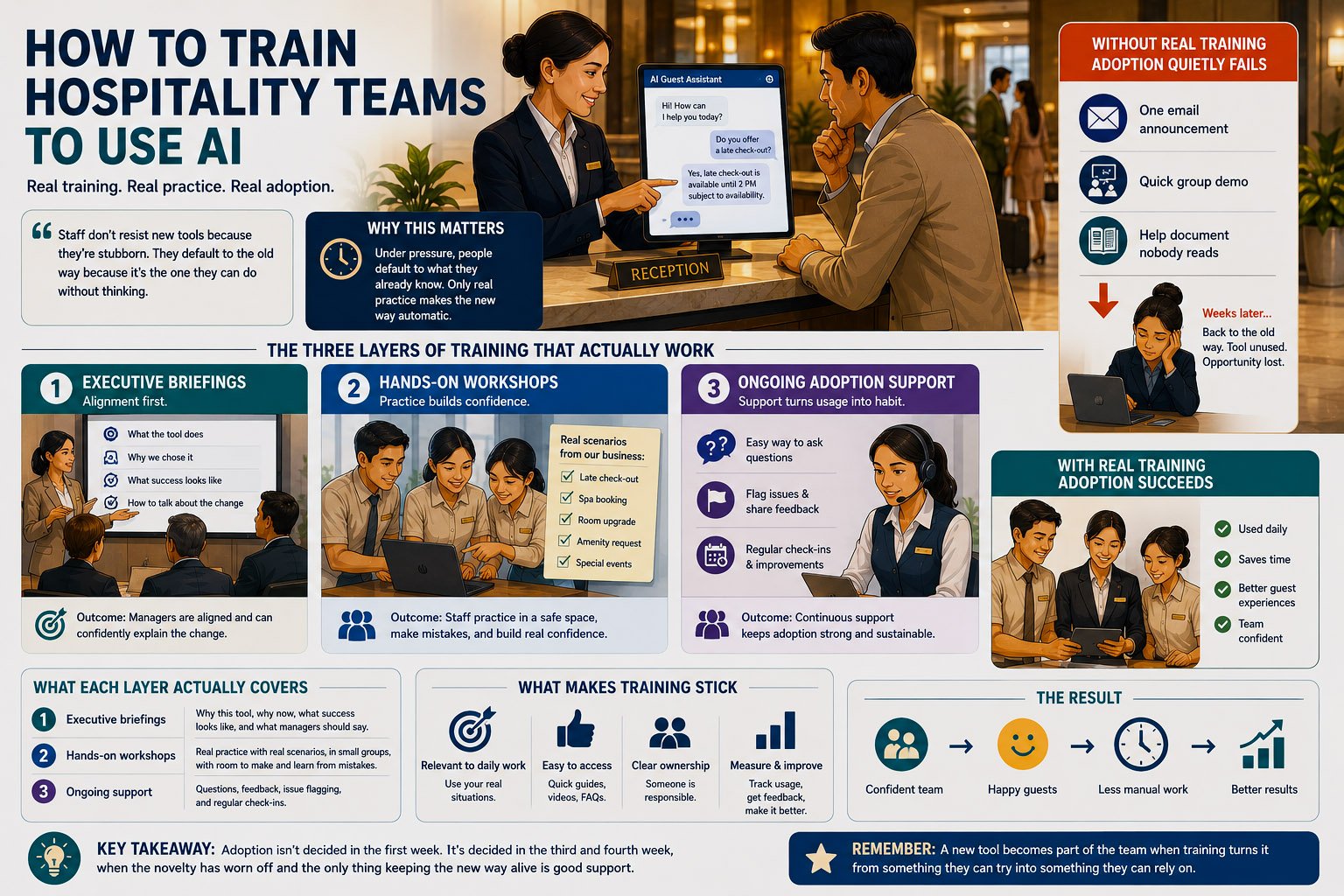
A hotel rolls out a new guest-messaging assistant with a single onboarding email, a quick demo, and a help doc nobody reads. Three weeks later, half the front desk team is quietly back to writing every reply from scratch — the tool felt unfamiliar under pressure, and nobody showed them what to do when it got something wrong. The tool wasn’t the problem. The training was.
This piece breaks down the three layers that actually work — briefings, hands-on practice, ongoing support — and exactly what changes staff behavior versus what just feels like training.
A hotel rolls out a new guest-messaging assistant with a single onboarding email explaining how it works, a quick demo at a Monday staff meeting, and a link to a help document nobody reads. Three weeks later, half the front desk team is quietly back to writing every reply from scratch, because the tool felt unfamiliar under pressure and nobody ever showed them what to do when it got something wrong. The tool wasn’t the problem. The training was.
This is the most common way AI adoption quietly fails in hospitality — not because staff are resistant to new tools, but because “training” got treated as a one-time announcement rather than something that actually changes how people work day to day. Real training for AI adoption looks different, and it’s worth being specific about what actually works versus what just feels like training.
Why This Matters
Hospitality teams already operate under real time pressure — a front desk handling check-ins, a guest waiting, a phone ringing. A new tool introduced without genuine training competes with all of that, and under pressure, people default to whatever they already know how to do well. A single announcement doesn’t change that default. Only real practice, repeated enough times that the new way becomes as automatic as the old one, does.
Staff don’t resist new tools because they’re stubborn. They default to the old way because it’s the one they can do without thinking, and a single training session never gets a new tool to that same level of comfort.
The Three Layers of Training That Actually Work
Effective training for AI adoption in a hospitality team has three distinct layers, each serving a different purpose — and skipping any one of them is usually where adoption breaks down.
Executive briefings — a clear, honest explanation to leadership and management about what the tool does, why it was chosen, and what success looks like. This isn’t hands-on training; it’s alignment, so managers can speak to the change with genuine understanding rather than repeating a vendor’s talking points.
Hands-on workshops — actual practice with the tool, using real or realistic scenarios from your own business, not a generic demo. This is where staff build the muscle memory that makes a new tool feel usable under pressure.
Ongoing adoption support — the sustained, lower-intensity layer that continues after the initial rollout: a way to ask questions, a process for flagging what’s not working, and periodic check-ins that catch quiet reversion before it becomes permanent.
Executive Briefings: What They’re For
This layer often gets skipped entirely, on the assumption that leadership already understands the tool since they approved buying it. That assumption is usually wrong in a specific way: approving a purchase and being able to explain, confidently and specifically, why this tool and what success looks like are different things. A manager who can’t answer a staff member’s skeptical question about why this change is happening undermines the whole rollout, even unintentionally.
A good executive briefing is short — often under an hour — and covers the specific problem the tool addresses, why it was chosen over alternatives, what a successful first month looks like, and what managers should say when staff ask why this is happening. It’s not technical training; it’s making sure the people staff will actually ask questions to have real, confident answers.
Hands-On Workshops: What Actually Works
This is the layer that determines whether staff can actually use the tool under real conditions, and it’s also the layer most often reduced to a rushed group demo. A demo shows people what the tool does. It doesn’t give them the practice needed to use it fluently when a guest is waiting and they’re already behind.
What actually works is smaller-group, hands-on practice with real or realistic scenarios pulled from your own business — actual guest questions your team handles regularly, not generic examples from a vendor’s training deck. Staff need to make mistakes in a low-stakes practice setting, see what happens, and try again, before they’re expected to use the tool with a real guest watching. This takes longer to set up than a group demo, and it’s the difference between staff who’ve seen the tool and staff who can actually use it.
In Practice: What Each Layer Actually Covers
- Executive briefings: why this tool, why now, what success looks like, and what managers should say when asked.
- Hands-on workshops: real practice with real scenarios from your own business, in small groups, with room to make and learn from mistakes.
- Ongoing adoption support: a clear channel for questions, a process for flagging problems, and scheduled check-ins that catch reversion early.
Ongoing Adoption Support: The Layer Most Often Skipped
This is where the hotel from the opening actually failed — not at the announcement, and not necessarily at the initial demo, but in the weeks after, when nobody was checking whether staff were actually using the tool or quietly reverting under pressure.
Adoption isn’t decided in the first week. It’s decided in the third and fourth week, when the novelty has worn off and the only thing keeping someone using a new tool is whether it’s genuinely easier than what they used to do.
Real ongoing support means a specific, known way for staff to ask questions or flag something that isn’t working — not a vague “let us know if you have issues.” It means someone is actually looking at usage and flagged conversations regularly, not just assuming things are fine because no one’s complained. And it means a scheduled check-in, a few weeks after launch, specifically to ask staff how it’s actually going, rather than waiting for problems to surface on their own.
What Actually Changes Behavior vs. What Doesn’t Stick
This is worth being direct about, because a lot of well-intentioned training fails for predictable reasons.
What actually changes behavior: repeated hands-on practice with real scenarios, visible early wins that make the new way feel genuinely easier, peer champions — a respected team member who’s already comfortable with the tool and can answer casual questions — and explicit permission to make mistakes without it feeling like a performance failure.
What doesn’t stick: a single training session, however well-delivered; a generic slide deck or vendor demo not customized to your actual guest questions; a mandate handed down without explanation of why; and training that happens once at launch with no follow-up, leaving staff to figure out edge cases entirely on their own.
The training that sticks isn’t the training that covers the most information. It’s the training that gets repeated enough times, with real stakes low enough, that the new behavior becomes as automatic as the old one.
The single biggest predictor of whether training sticks isn’t how polished the initial session was — it’s whether there was a second touchpoint, and a third, rather than a single event treated as complete.
Adapting Training Across Different Roles
Not every staff member needs the same depth of training, and treating a front desk agent, a department head, and a housekeeping supervisor identically usually wastes time on some and underserves others. Front-line staff who’ll use a tool daily need the most hands-on practice time — they’re the ones who need it to feel automatic under pressure. Department heads need enough hands-on exposure to support their team’s questions, plus the executive-briefing-level understanding of why and what success looks like. Staff in adjacent roles, who might occasionally interact with the tool’s output without using it directly, often need only a brief overview rather than full hands-on training.
Training that treats every role identically usually means the people who need the most practice get too little, while people who barely touch the tool sit through more than they need.
Being deliberate about this — rather than defaulting to “everyone gets the same one-hour session” — makes the whole rollout more efficient and more likely to actually stick where it matters most.
A Worked Example
A mid-sized hotel relaunched its guest-messaging assistant after the failed first attempt described earlier, this time with all three layers deliberately built in. A short executive briefing gave department heads specific talking points and a clear sense of what the first month would look like. A hands-on workshop, run in groups of four, used the hotel’s actual most common guest questions rather than generic examples, with staff practicing drafting and reviewing responses before ever using the tool live.
The difference showed up in the ongoing support layer most clearly: a designated staff member — someone already comfortable with the tool from the workshop — became the informal go-to for quick questions, and a two-week check-in specifically asked the front desk team what was and wasn’t working. That check-in surfaced a real gap (the tool was mishandling a specific type of question about late checkout) that got fixed before it eroded trust further. Three months in, usage had held steady rather than quietly declining, and staff described the tool as “just part of how we do things now” rather than something imposed on them.
Common Mistakes
The most common mistake is treating training as a single event — an announcement, a demo, done — rather than a process with at least three distinct touchpoints over the first month. A close second is using generic training materials instead of your own real scenarios, which makes the tool feel abstract and unfamiliar exactly when staff need it to feel concrete and usable. The quieter mistake is skipping the executive briefing layer specifically, assuming managers already understand the tool well enough to support their teams through it, when in reality a manager who can’t confidently explain “why this, why now” undermines trust in the rollout even without meaning to.
How to Know You’re Ready
In Practice: Signs You’re Ready to Train Your Team
- You have real, specific scenarios from your own business to use in hands-on practice — not just generic examples from a vendor.
- A manager or department head can already explain, confidently, why this tool and what success looks like — if not, start with the executive briefing first.
- You’ve identified who will be available for ongoing questions after the initial rollout, not just during launch week.
- You’re planning at least one scheduled check-in in the weeks after launch, not just hoping problems will surface on their own if they exist.
Getting Started
In Practice: A Realistic Training Plan
- Run a short executive briefing first, covering why this tool, why now, and what success looks like — even if it’s just a conversation with department heads.
- Build a hands-on workshop around your own real guest questions, in small groups, with room to practice and make mistakes before going live.
- Name a specific point of contact for ongoing questions, and make sure staff actually know who it is.
- Schedule a two-to-four-week check-in from the start, specifically to ask how it’s actually going, rather than waiting for a formal review cycle.
Frequently Asked Questions
How much time should training actually take? Less than most leaders fear — a short executive briefing, a hands-on workshop of an hour or two per small group, and periodic light-touch check-ins afterward is usually enough, spread over the first month rather than concentrated in a single day.
Do we need to train the whole team at once? Smaller groups tend to work better for the hands-on workshop specifically, since it allows for real practice and questions rather than a passive group demo — staggering training over a week or two is often more effective than one large session.
What if some staff are more resistant than others? A peer champion — a colleague who’s already comfortable and enthusiastic, not a manager — is often more persuasive to a skeptical team member than any formal training session.
How do we know if training actually worked? Usage that holds steady or grows after the first few weeks, rather than quietly declining, is the clearest signal — a scheduled check-in is specifically designed to catch early reversion before it becomes permanent.
Should training materials come from the tool vendor or be built in-house? Vendor materials are a reasonable starting point, but they should be adapted to your own real scenarios before use — generic examples rarely land as well as your team’s actual, familiar guest questions.
What if we don’t have anyone confident enough to be a peer champion yet? Identify whoever picks up the tool fastest during the hands-on workshop and invest a little extra support in them early — a peer champion can be developed rather than needing to already exist.
How does this connect to the broader adoption roadmap? Training and rollout are the execution stage of what an adoption roadmap plans for — if you haven’t yet worked out what an AI adoption roadmap is and which opportunity you’re actually training your team around, that’s worth doing first.
Do department heads need the same hands-on training as front-line staff? Not necessarily the same depth, but they do need enough hands-on exposure to support their team’s questions credibly — a department head who’s only seen a slide deck can’t help a struggling staff member the way one who’s actually practiced with the tool can.
What’s a reasonable way to measure whether training actually worked, beyond just usage numbers? Ask staff directly, a few weeks in, whether the tool feels easier or harder than the old way — a tool that’s genuinely helping usually gets described in practical, specific terms, while one that isn’t sticking often gets vague or hesitant answers.
Final Thoughts
The hotel from the opening didn’t need a more sophisticated tool the second time around — it needed training that treated adoption as a process, not an announcement: a briefing that gave managers real answers, a workshop built around real guest questions, and someone actually checking in during the weeks that decide whether a new habit sticks or quietly fades.
That’s most of what makes AI adoption succeed in hospitality — not a smarter tool, just training that respects how people actually learn new habits under real pressure. For a look at the specific, recurring ways adoption efforts go wrong even with good intentions, common AI adoption mistakes is worth reading next. This fits within the broader picture of AI adoption roadmaps for travel businesses and AI for the travel industry as a whole.
Last updated: August 2026