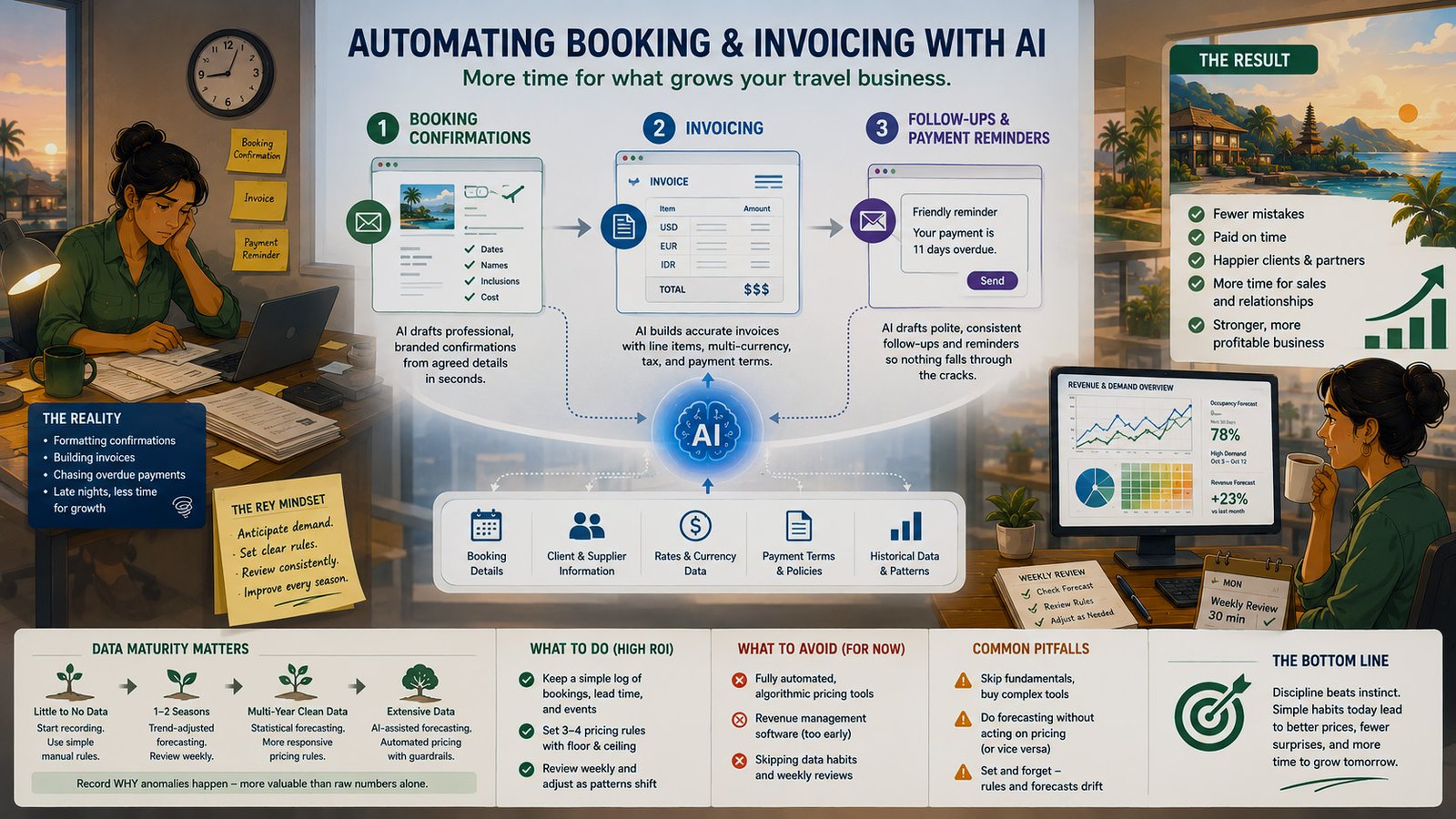
A travel agency owner finishes her last client call at 6 p.m. and starts the part of the day nobody sees: formatting a booking confirmation, building an invoice in three currencies, drafting a payment reminder to a partner now eleven days overdue. By the time she’s done, it’s past nine.
This is the least glamorous corner of “AI for travel” — no chatbot, no itinerary generator, just formatting and follow-ups eating hours every week. It’s also one of the safest, fastest places to start. This piece covers what’s genuinely safe to automate, and what still needs a human’s judgment.
A travel agency owner finishes her last client call at 6 p.m. and starts the part of the day nobody sees: formatting a booking confirmation for a group of eight, building an invoice with three different currencies because the client, the supplier, and her own business all bill differently, and drafting a payment reminder to a DMC partner who’s now eleven days overdue. By the time she’s done, it’s past nine. None of this was the reason she started a travel agency. All of it has to happen anyway.
This is the part of the business that “AI for travel” content rarely talks about, because it’s not glamorous — there’s no guest-facing chatbot, no clever itinerary generator, just formatting, line items, and follow-up messages that eat hours every single week. It’s also one of the lowest-risk, fastest-payoff places to apply AI, precisely because it’s repetitive, structured, and doesn’t touch the guest relationship the way other automation does.
Why This Decision Matters
Admin work doesn’t announce itself as a problem the way a guest complaint does. It just quietly eats the hours that should have gone into sales calls, supplier relationships, or actually running the business — and because it happens in the evening or between other tasks, it’s easy to underestimate how much time it actually consumes over a month or a season.
The cost of unautomated admin work isn’t visible on any single day. It shows up as the strategic work that never gets done because there’s never quite enough time left for it.
Getting this right doesn’t require anything sophisticated — booking confirmations, invoices, and follow-ups are some of the most structured, repeatable tasks in a travel business, which makes them an unusually safe place to start with AI compared to guest-facing work where a mistake is visible in real time.
What “Automating Booking & Invoicing” Actually Means
This isn’t one project — it’s three related but distinct workflows, each with its own realistic automation ceiling.
Booking confirmations are the message sent to a client or supplier once a booking is agreed, restating the details — dates, names, inclusions, cost — in a formal, client-ready format.
Invoicing turns a confirmed booking into a properly formatted bill, with correct line items, currency, tax treatment, and payment terms.
Follow-ups and payment reminders are the ongoing communication after a booking or invoice goes out — confirming receipt, chasing overdue payments, sending pre-departure reminders.
Each of these can be automated to a meaningful degree, but not to the same degree, and not without a human checkpoint at the right place in each.
Booking Confirmations: What Can Be Automated
A booking confirmation is mostly a formatting exercise once the underlying details are settled — pulling agreed dates, names, inclusions, and cost into a clean, consistent, branded document or message. This is exactly the kind of repetitive, low-judgment task that automates well: the information already exists somewhere (a conversation, a spreadsheet, a booking system), and the job is arranging it correctly, not deciding anything new.
Where this gets riskier is with non-standard bookings — a group booking with a custom split payment arrangement, a booking with unusual cancellation terms negotiated specifically for this client, or anything where the “standard” confirmation template doesn’t actually capture what was agreed. These need a human to draft or at minimum carefully review before they go out, because an automated confirmation that misses a negotiated detail creates a real dispute risk later.
| Booking type | Automation level |
|---|---|
| Standard single or family booking | High — template-driven, safe to automate fully with light review |
| Group booking with standard terms | Moderate — automate the format, human confirms the specifics |
| Custom or negotiated terms | Low — human should draft or closely review before sending |
| Booking with unusual payment structure | Low — errors here carry real financial and relationship risk |
Invoicing: What Can Be Automated
Once a booking is confirmed, turning it into an invoice is largely a formatting and calculation exercise — line items, currency conversion where relevant, tax treatment, and payment terms, populated from the same underlying booking details. For agencies and DMCs handling a high volume of fairly standard bookings, this is often the single highest-leverage place to automate, because the manual version of this task is pure re-typing with real error risk built in.
The caution here is different from booking confirmations: invoicing mistakes are financial, not just informational, and they tend to be more consequential. A wrong currency conversion, an incorrect tax treatment, or a line item that doesn’t match what was actually agreed doesn’t just look sloppy — it creates a real financial discrepancy that takes time to untangle and can damage trust with a client or supplier. This makes invoicing a strong candidate for automating the formatting and calculation, paired with a mandatory human check before anything goes out, at least until a system has a long track record of accuracy.
In practice, this means automating the pull-through of confirmed booking details into the invoice template rather than manual re-entry, keeping currency and tax logic simple and explicit rather than assumed to stay correct indefinitely, and requiring a human check before sending for at least the first several months, even once the system seems reliable. Anything that doesn’t match a standard booking pattern should be flagged for manual handling rather than forced through the automated template.
Follow-Ups & Payment Reminders: What Can Be Automated
This is the layer with the clearest, fastest payoff and the lowest risk, because the content is highly repetitive and the stakes of a slightly-off message are lower than with a confirmation or invoice. A payment reminder sent three, seven, and fourteen days after an invoice’s due date, with an escalating but still polite tone, is exactly the kind of task that benefits from automation — it’s tedious to track manually, easy to forget, and doesn’t require fresh judgment each time.
Where this needs a human touch is anything involving a genuine dispute, a client relationship under strain, or a payment issue that’s really about something else — a service complaint masquerading as a late payment, a long-standing client going through a rough patch who deserves a different tone than a first-time booker. An automated reminder sequence should have a clear point where it stops and hands off to a person, rather than continuing to send increasingly firm messages to someone who’s already told you why they haven’t paid.
What’s Safe to Automate Fully
In Practice: What’s Safe to Automate Fully
- Standard booking confirmations for single travelers or families with no negotiated terms.
- Invoice formatting and line-item pull-through from already-confirmed booking details, with a human check before sending.
- Routine payment reminder sequences, with a clear escalation point that hands off to a person rather than continuing indefinitely.
- Receipt confirmations and simple status updates — “we’ve received your payment,” “your booking is confirmed” — where there’s no judgment involved at all.
What Still Needs a Human
It’s worth being direct about the limits, since this is exactly where automation projects in this space tend to go wrong.
The line isn’t “simple versus complex.” It’s “standard versus negotiated.” The moment a human agreed to something outside the template, a human needs to be the one confirming it in writing.
Anything involving negotiated terms — custom cancellation policies, special payment arrangements, group discounts agreed verbally — needs a human to draft or closely review, because an automated system working from a standard template will, by definition, miss the exception. Anything involving a client relationship under visible strain — a complaint, a dispute, a payment issue with an emotional component — needs a person’s judgment about tone and content, not a scheduled reminder. And anything involving real financial risk at unusual scale — a large group booking, an unusually high-value invoice — deserves a human review even if the underlying process is otherwise automated, simply because the cost of a mistake is higher.
The Three-Tier Setup
Automation for booking and invoicing generally falls into three tiers, and knowing which one you actually need matters.
The first tier is template automation — pre-built, fill-in-the-blank documents populated from booking details, with no real language generation involved. Cheap, reliable, and appropriate for the bulk of standard bookings and invoices.
The second tier is AI-assisted drafting — a system that drafts a full confirmation, invoice cover note, or follow-up message based on the specific details of a booking, adapting tone and content more flexibly than a rigid template, with a human reviewing before sending. This handles more variation than pure templating while still keeping a person in the loop.
The third tier is fully integrated automation — booking, invoicing, and follow-ups connected directly to a booking or accounting system, triggering automatically with minimal human review. This is the most powerful tier and the one that requires the most trust, the most historical accuracy, and the most caution, since mistakes propagate faster with less opportunity to catch them.
In Practice: Choosing Your Starting Tier
- Most agencies and DMCs should start with template automation for confirmations and invoices — it’s the lowest-risk, fastest-to-implement option.
- Move to AI-assisted drafting once template automation is trusted and there’s a clear need for more flexibility (varied booking types, more personalized follow-up tone).
- Consider fully integrated automation only once accuracy has been proven over a genuine track record, and only for the most standard, lowest-risk transaction types.
- Keep a human check in the loop for invoicing specifically, longer than you might for confirmations or reminders, given the financial stakes.
Why Invoicing Errors Cost More Than Chat Errors
It’s worth pausing on why invoicing deserves more caution than, say, a guest-facing FAQ chatbot elsewhere in a travel business. A wrong chatbot answer is usually correctable in the next message, with minimal lasting cost. A wrong invoice is a financial document — it may get paid incorrectly, it may need to be reissued, it may create a tax or accounting discrepancy that takes real time to untangle, and it can genuinely damage a client or supplier relationship if it looks like carelessness rather than an honest mistake.
An error in a chat message costs a moment of guest confusion. An error in an invoice costs someone real time to find, explain, and fix — and sometimes costs trust that doesn’t rebuild as quickly as the mistake was made.
This is exactly why the recommendation throughout this piece leans toward keeping a human check in the invoicing loop longer than for other admin tasks, even once the underlying automation has proven reliable elsewhere.
A Worked Example
A mid-sized DMC handling both direct family bookings and agent-placed group bookings started with template automation for its most common transaction type: standard family bookings with no negotiated terms, which made up roughly two-thirds of its volume. Confirmations and invoices for these bookings were generated automatically from the booking record, with a staff member doing a quick two-minute check before sending — catching the occasional data-entry error, but rarely a substantive mistake.
Group bookings and anything with negotiated terms stayed fully manual, deliberately. Staff time that used to go into formatting standard confirmations and invoices went instead into these more complex, higher-value bookings, where the judgment actually mattered. Within a season, the team estimated they’d recovered several hours a week — not from any single dramatic change, but from no longer manually re-typing the same structural information into confirmations and invoices for the majority of straightforward bookings.
Common Mistakes
The most damaging mistake is automating invoicing without a human check during the early months, trusting the system before it’s earned that trust — a currency or tax error that goes out unchecked can take far longer to resolve than the time automation was supposed to save. A close second is trying to force negotiated or non-standard bookings through a standard automated template, which either produces a confirmation that misses the actual agreed terms or forces staff to spend more time working around the template than they would have spent just writing it manually. The quieter mistake is letting an automated follow-up sequence continue indefinitely without an escalation point — a payment reminder that keeps firing at increasing firmness to a client who’s already explained why they haven’t paid reads as tone-deaf at best and damages the relationship at worst.
Choosing a Tool: Simple Templates vs. an Integrated System
For most travel agencies and DMCs, a straightforward template system — pulling confirmed booking details into pre-built confirmation and invoice formats — covers the majority of the available value, is inexpensive to set up, and is easy for any staff member to understand and adjust. A more integrated system, connecting directly to a booking platform or accounting software, becomes worth the additional cost and complexity once transaction volume is high enough that manual triggering of even a template-based process becomes a bottleneck, or once a business wants follow-up sequences to run automatically without someone manually starting each one.
There’s no fixed volume threshold where one becomes clearly right over the other — it’s usually apparent once the manual step of “starting” the automated process for each booking starts taking almost as long as the old fully-manual approach did.
The right time to move from templates to a more integrated system isn’t a specific transaction volume — it’s the moment the template system’s manual triggering step becomes its own small chore.
Measuring Whether It’s Working
Success here isn’t “we sent more invoices faster” — it’s whether staff time actually shifted away from repetitive formatting and toward the parts of the job that need real judgment, and whether accuracy held steady or improved.
In Practice: What to Track After Adopting This
- Hours spent on confirmations and invoicing, before and after — the clearest, most direct signal of whether this is actually saving time.
- Error rate on invoices and confirmations, compared to the manual process — automation should reduce errors, not just relocate them.
- How often the human check catches something significant, which tells you whether the review step is still earning its place or has become a rubber stamp.
- Client or supplier feedback related to billing or confirmations specifically — a rise in billing-related questions or disputes is an early warning sign worth investigating.
If hours saved are real and error rates hold steady or improve, it’s reasonable to expand which transaction types are automated. If errors increase or the human check keeps catching real problems, that’s a sign to narrow scope rather than push forward.
How to Know You’re Ready
In Practice: Signs You’re Ready to Start
- You can identify your most common, standard transaction type — the booking pattern that repeats most often with the least variation.
- Someone can commit to reviewing automated confirmations and invoices, at least for the first few months, even once the system seems reliable.
- Your current process for negotiated or non-standard bookings is already handled carefully by hand — automation should extend that care to the standard cases, not replace it for the complex ones.
- You have a reasonably consistent invoice and confirmation format already, or are willing to establish one — automation works best once there’s a clear standard to encode.
Frequently Asked Questions
Will this replace the need for admin staff? Not typically — it removes the most repetitive re-typing and formatting work, freeing that time for the judgment-heavy tasks (negotiated bookings, client relationships, supplier management) that still need a person.
How do I handle multi-currency invoicing safely? Keep the currency conversion logic simple, explicit, and reviewed periodically — this is one of the areas most worth a human check even in an otherwise well-automated system, since exchange rate handling errors are easy to miss and costly to unwind.
What if my booking volume is too small to justify automation? Even a modest volume of repetitive, standard bookings can benefit from simple template automation — the threshold is more about how repetitive your transaction patterns are than raw volume.
Can this integrate with my existing accounting software? Often yes, depending on the software, though this typically falls into the more integrated tier rather than a starting point — most businesses benefit from proving out simpler template automation first.
How do I know if a follow-up sequence has gone on too long without human involvement? Set a clear rule in advance — for example, no more than two automated reminders before a human reviews the account — rather than letting the sequence run indefinitely by default.
What’s the biggest risk specific to invoicing automation? Financial errors that go unnoticed before sending — this is why a human check in the loop matters more here than almost anywhere else in a travel business’s automation.
Should confirmations and invoices use the same underlying system? Ideally yes, or at least pull from the same source booking record — keeping them in sync avoids the common problem of a confirmation and an invoice quietly disagreeing on the details.
How long does it typically take to set up basic template automation? Considerably faster than more integrated systems — most agencies can have standard confirmation and invoice templates automated within a matter of weeks, assuming their booking details are reasonably well-organized to start.
What about VAT or other tax-specific requirements? These need to be encoded carefully and reviewed by someone with the relevant expertise before automating — tax rules vary by jurisdiction and change periodically, and an automated system is only as accurate as the rules it was given.
Final Thoughts
The agency owner from the opening didn’t need her evenings back through some dramatic transformation — she needed the two-thirds of her bookings that follow a standard, repeatable pattern handled without her re-typing the same structure every time, so her actual evening hours could go toward the group bookings and client relationships that genuinely needed her attention. That’s the realistic promise of automating booking and invoicing: not a business that runs itself, just fewer hours lost to formatting.
This kind of admin-layer automation connects closely to AI workflow automation for travel agencies and the broader question of reducing admin work with AI across a travel business. If you’re ready to think through what a project like this would actually involve for your specific operation, what an AI automation project looks like walks through the real stages. This fits within the wider picture of back-office and operations automation and AI for the travel industry as a whole.
Last updated: July 2026