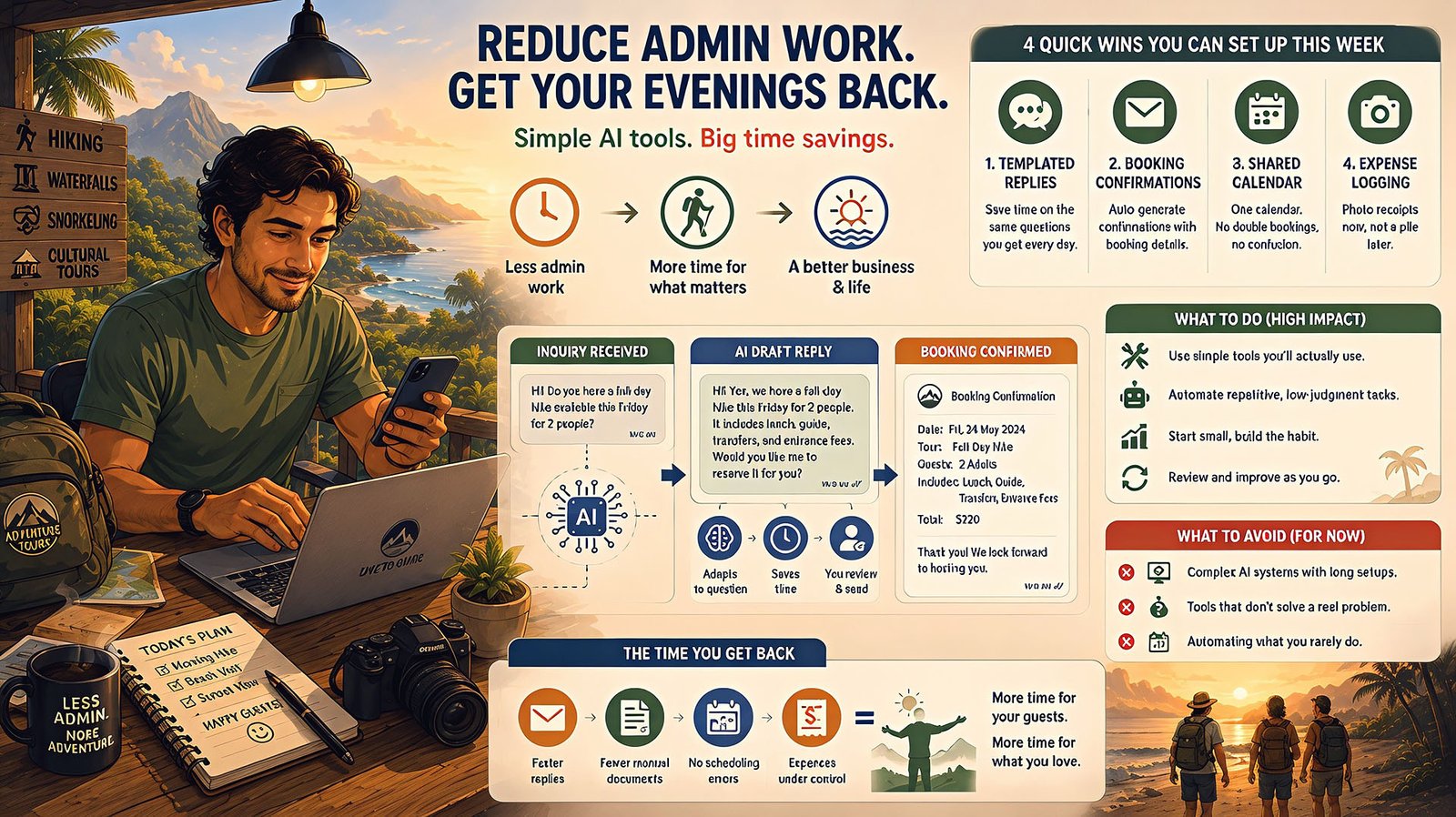
A solo tour operator guides a full-day hike, gets home at 6, and starts the second job: replying to tomorrow’s inquiries, updating a calendar so two groups don’t double-book, logging today’s receipts before they vanish into a bag. He didn’t start this business for his evenings to look like this.
This isn’t a strategy article. It’s four concrete things you can set up this week — no framework, no big project, just quick wins sized for someone with twenty spare minutes, not a free afternoon.
A solo tour operator guides a full-day hike, gets home at 6, and starts the second job: replying to tomorrow’s inquiries, updating a shared calendar so two groups don’t accidentally get booked for the same slot, logging today’s fuel and permit receipts before they get lost in a bag, and sending confirmation messages for next week’s bookings. He didn’t start this business to spend his evenings on data entry. Most days, he doesn’t have the energy left to think about “AI automation” — he just wants his evenings back.
If that’s you, this isn’t a strategy article. It’s a list of concrete, low-effort things worth trying first, before anything more ambitious — because when you’re doing everything yourself, the right starting point isn’t a framework, it’s a handful of quick wins you can actually set up this week.
Why This Matters More When You’re Doing It All Yourself
A larger business can absorb inefficient admin work by spreading it across a team. A solo or near-solo operator can’t — every hour spent on admin is an hour not spent guiding, marketing, or resting, and there’s no one else to hand the overflow to. That makes admin time here a more direct, personal cost than it is almost anywhere else in the industry.
For a solo operator, admin time isn’t overhead. It’s time stolen directly from the parts of the business — and the life — that actually matter to you.
Start With the Low-Lift Wins
Forget the big picture for a moment. Here are four things worth trying this week, roughly in order of how little effort they take to set up.
Templated replies for your most repeated questions. If you’re typing some version of the same answer — tour times, what to bring, meeting point — several times a day, a small set of saved, reusable replies (even a basic one, not an AI-powered one) removes most of that typing instantly. This costs nothing and takes twenty minutes to set up.
Auto-generated booking confirmations. Once a booking is agreed, a simple template that pulls in the date, group size, and price — rather than typing a fresh confirmation message each time — saves real minutes on every single booking, which adds up fast at any real volume.
A single shared calendar, not a mental one. This isn’t AI at all, but it’s often the highest-leverage fix available: if double-bookings or scheduling confusion are a recurring problem, a shared digital calendar that’s actually kept current eliminates a specific, stressful category of mistake before any smarter tool is even worth considering.
Photo-based expense logging. Taking a photo of a receipt the moment you get it, rather than saving a pile to sort through later, turns an end-of-month dread task into thirty seconds spent in the moment. Several simple apps handle this without needing anything sophisticated.
In Practice: This Week’s Quick Wins
- Write down your five most-repeated guest questions and draft one good, reusable answer for each — use it starting tomorrow.
- Build one confirmation message template and use it for every standard booking this week.
- Move your bookings to a single shared calendar, even if it’s a free, simple one — consistency matters more than sophistication here.
- Start photographing receipts the moment you get them, rather than saving them for a monthly catch-up session.
None of these require any real technical setup, and all four are things you can start today, not “eventually once you have time to learn a new system.”
What Takes a Bit Longer, But Pays Off
Once the quick wins are in place and genuinely part of your routine, a few slightly bigger steps are worth considering.
Drafting tools that generate a first-pass reply to a new inquiry — not just a saved template, but something that adapts to the specific question — save more time than a static template once your inbox has real variety in it. Invoicing automation that pulls confirmed booking details into a properly formatted invoice, rather than typing each one from scratch, becomes worth the modest setup effort once you’re issuing more than a handful a week. automating booking and invoicing covers what’s realistic here in more depth, including what still genuinely needs your personal attention.
What Not to Bother With Yet
It’s worth being honest about what to skip, because a lot of AI-for-tourism advice assumes more time and technical patience than a solo operator actually has.
The biggest mistake a time-poor operator can make isn’t automating too little. It’s trying to set up something sophisticated, running out of energy halfway through, and ending up with a half-built system that’s worse than doing things the old way.
Skip anything requiring a multi-week setup process before it delivers any value — if a tool promises to “transform your operations” but needs a month of configuration first, that’s not the right fit for someone with no spare hours. Skip fully custom, integrated systems until the simple wins above have been running smoothly for a while — there’s no reason to build something sophisticated before proving the basics actually help. And skip anything that requires you to change your entire workflow at once; the wins above work precisely because they slot into what you’re already doing, rather than requiring you to relearn how you run your business.
A Worked Example
A one-person kayaking tour operator started with exactly the four quick wins above, one at a time, over about three weeks — not all at once. The templated replies alone cut his evening inbox time roughly in half within the first few days, since the same five questions had been eating most of that time without him quite realizing it. The shared calendar eliminated a double-booking mistake that had cost him an awkward, apologetic phone call about once a month.
He didn’t move on to anything more sophisticated for almost two months — deliberately. The quick wins were enough to give him back a real, noticeable chunk of his evenings, and he wanted to feel that improvement settle in before spending any more time or attention on the business’s admin systems.
He didn’t need a transformation. He needed his evenings back, and four small changes got him most of the way there.
Common Mistakes
The most common mistake, especially for solo operators, is trying to fix everything at once out of frustration with how much admin has piled up — this almost always leads to abandoning the effort partway through, since there’s no spare time to sustain a big project. A close second is choosing a sophisticated, feature-rich tool because it looks more serious, when a much simpler option would have solved the actual problem with far less setup time. The quieter mistake is not measuring whether a change actually helped — if you set up a templated reply system and don’t check back in a few weeks to see whether it’s genuinely saving time, you can’t tell the difference between something working and something you’ve just gotten used to.
Noticing Whether It’s Actually Working
For a solo operator, “measuring” doesn’t need to mean anything formal — it just means pausing occasionally to notice whether the specific pain point that prompted the change has actually eased.
The easiest way to know if a quick win is working isn’t a spreadsheet. It’s noticing whether you’re still dreading the same task you set out to fix.
In Practice: A Simple Way to Check What’s Working
- Notice your evening admin time roughly, before and after each change — you don’t need exact numbers, just an honest sense of whether it’s genuinely shorter.
- Ask yourself if the specific dread you had about a task is still there — a real win usually comes with a felt sense of relief, not just a technical improvement.
- If nothing feels different after a few weeks, be honest about it — drop that change and try a different quick win rather than sticking with something that isn’t actually helping.
- Notice if a new task has become the most annoying one — that’s often a sign the previous fix genuinely worked, and it’s simply revealed the next thing worth tackling.
How Bali Tour Operators Are Approaching the Same Problem
If you’re running a tour business specifically in Bali, the same low-lift logic applies, though the specific starting point often looks slightly different given how WhatsApp-centric bookings tend to be in that market — how Bali DMCs are approaching this covers a concrete, local version of the same starting-point thinking.
Getting Started When You Have Zero Spare Time
In Practice: Getting Started With Almost No Time to Spare
- Pick just one of the four quick wins, not all four at once — starting small is what makes this sustainable for someone with no time to spare.
- Set a specific, tiny time budget — twenty minutes this evening — rather than waiting for a free afternoon that may never come.
- Use whatever tool you already have access to rather than researching the “best” option — a basic template in your existing messaging app beats a sophisticated tool you never get around to setting up.
- Check in after two weeks, not to overhaul anything, but just to notice whether the one change you made is actually helping.
How to Know You’re Ready
In Practice: Signs You’re Ready to Try This
- You can name the specific admin task eating the most evening or weekend time right now, even roughly.
- You have at least twenty minutes this week to set up one small change — this genuinely doesn’t require more than that to start.
- You’re willing to start with the smallest possible version, not the most complete one.
- You’re prepared to actually use whatever you set up, rather than building it and forgetting about it under the next busy week’s pressure.
Frequently Asked Questions
I barely have time to read this article, let alone set anything up. Where do I actually start? Pick the templated-replies win and do just that one thing this week — it takes the least setup time of the four and usually delivers the fastest, most noticeable relief.
Do I need to buy any software for these quick wins? Not necessarily — templated replies and a shared calendar can both be set up with tools you likely already have, like your existing messaging app or a free calendar tool.
How do I know if a bigger automation project is worth the time investment? Only once the quick wins have been running for a few weeks and you’ve confirmed they’re genuinely helping — trying to judge readiness for a bigger project before that point is guessing.
What if I try one of these and it doesn’t actually save time? That’s useful information — drop it and try a different one rather than forcing something that isn’t working for your specific admin pattern.
Should I hire help instead of automating? For a genuinely overwhelmed solo operator, both can make sense, and they’re not mutually exclusive — automation reduces the total admin load, which can also make a part-time hire’s job more manageable if you do bring someone on.
How much time can I realistically expect to save? It varies, but even modest quick wins commonly recover several hours a week for an operator handling a meaningful volume of repeat inquiries — the Bali kayaking operator example above cut his evening inbox time roughly in half from the first win alone.
I tried something like this before and gave up. How is this different? This approach is specifically designed around doing one small thing at a time rather than a full system — if a previous attempt failed, it may simply have been too big a first step rather than the wrong idea entirely.
Is it worth asking a family member or friend to help set this up if I’m not tech-savvy? Yes, if that’s available to you — none of the quick wins require deep technical skill, and having someone help with the initial twenty-minute setup can be the difference between starting this week and putting it off indefinitely.
What’s the very next step after these four quick wins are working well? what an AI automation project looks like covers the real stages of a more structured project, for whenever you’re ready to go beyond the quick wins covered here.
Final Thoughts
The kayaking operator from the opening didn’t need a business transformation. He needed his evenings back, four small, low-lift changes at a time, each one proven before moving to the next. If you’re doing everything yourself and drowning in admin, that’s the right place to start too — not a framework, not a big project, just one small win this week.
This fits within the broader picture of back-office and operations automation and AI for the travel industry as a whole.
Last updated: July 2026